
The short answer
Birdeye and ReplyChamp both write replies to your reviews with AI. The difference is everything around that. Birdeye bundles reviews from 200+ sites with listings, messaging, social, a chatbot, surveys, ticketing and competitor tracking, and you buy it through a sales team. ReplyChamp only replies to Google reviews, and you can sign up and start in a few minutes.
Neither is better in general. Birdeye is built for brands with many locations and a marketing team. ReplyChamp is built for the owner who answers their own Google reviews and wants that job to take five minutes a week instead of an evening.
This page compares the two on price, features, contracts and approvals, says honestly when Birdeye is the better pick, and shows how to switch if you decide to.
Birdeye pricing vs ReplyChamp
Birdeye doesn’t publish prices on its own website. Its pricing page asks how many locations you have (in bands from 1–3 up to 1,000+) and a sales team gives you a quote. Its G2 and Capterra listings name three plans, all “contact us” or “custom quote”.
| Plan | Price | What you get |
|---|---|---|
| Birdeye Starter | Custom quote | Reviews AI, Listings AI and Messaging AI (per its G2 listing). Capterra adds unlimited users and contacts, campaigns, team chat, payments and integrations |
| Birdeye Growth | Custom quote | Everything in Starter, plus Social AI |
| Birdeye Dominate | Custom quote | Everything in Growth, plus Chatbot AI |
| ReplyChamp | $7 per location per month, or $70 a year | A drafted reply to every new Google review, in your voice. Auto-reply only for the ratings you choose. First 10 replies free, cancel any time |
G2 says a free trial of Birdeye is available, and Capterra lists one with no card needed; Birdeye’s own site doesn’t mention a trial. Third-party sites sometimes quote Birdeye prices, but Birdeye doesn’t confirm them, so ask for a written quote that includes setup and the contract term.
Birdeye vs ReplyChamp features
| Birdeye | ReplyChamp | |
|---|---|---|
| What it is | An AI platform for reviews, listings, messaging, social, chatbot, surveys, ticketing and competitors | A Google review reply tool |
| Review sites | 200+ review sites | Google only |
| AI review replies | Its Review Response Agent “posts on its own, or holds for approval”. You choose | Drafts in your voice, learned from replies you’ve written yourself |
| Low-star and sensitive reviews | Held if you set approval rules | 1–2★ wait for you unless you choose All reviews. Health, safety, legal and refund reviews always wait |
| Review requests | Yes, on the channel it says gets the most responses | No. Our free review link and QR code tool helps you ask |
| Listings, messaging, chatbot | Yes | No |
| Getting started | Quote form or demo with sales | Sign in with Google and connect your profile yourself |
| Contract | Auto-renews for the same term unless you give 90 days’ written notice | None. Cancel any time |
| Built for | Multi-location brands; healthcare, dental, auto, legal, real estate, franchises and more | Owners who look after their own Google profile |
Birdeye details are from the sources listed at the end of this page, checked on November 4, 2026. Birdeye changes its products and plans, so check their site for the latest. Birdeyeis a trademark of its owner, and ReplyChamp isn't affiliated with Birdeye.
Birdeye’s contract terms, in plain words
Birdeye’s public terms of service say three things every buyer should know before signing an order form:
- It renews automatically. An agreement “will auto renew for the same period of time as the initial term”. If you signed for a year, the renewal is another year.
- You need to give 90 days’ notice. To stop the renewal, Birdeye needs written notice of non-renewal at least 90 days before the renewal date. Miss that window and you’re in for another term.
- Payments are non-cancellable and non-refundable, except where the terms say otherwise.
None of this is unusual for enterprise software, and Birdeye’s terms also say you own your data. But if you’re a single location used to month-to-month apps, put the notice date in your calendar the day you sign.
How the AI replies compare
Birdeye’s Review Response Agent can post replies on its own or hold them for approval, and you decide which. That puts the safety rules in your hands: if you set it to post everything, it will.
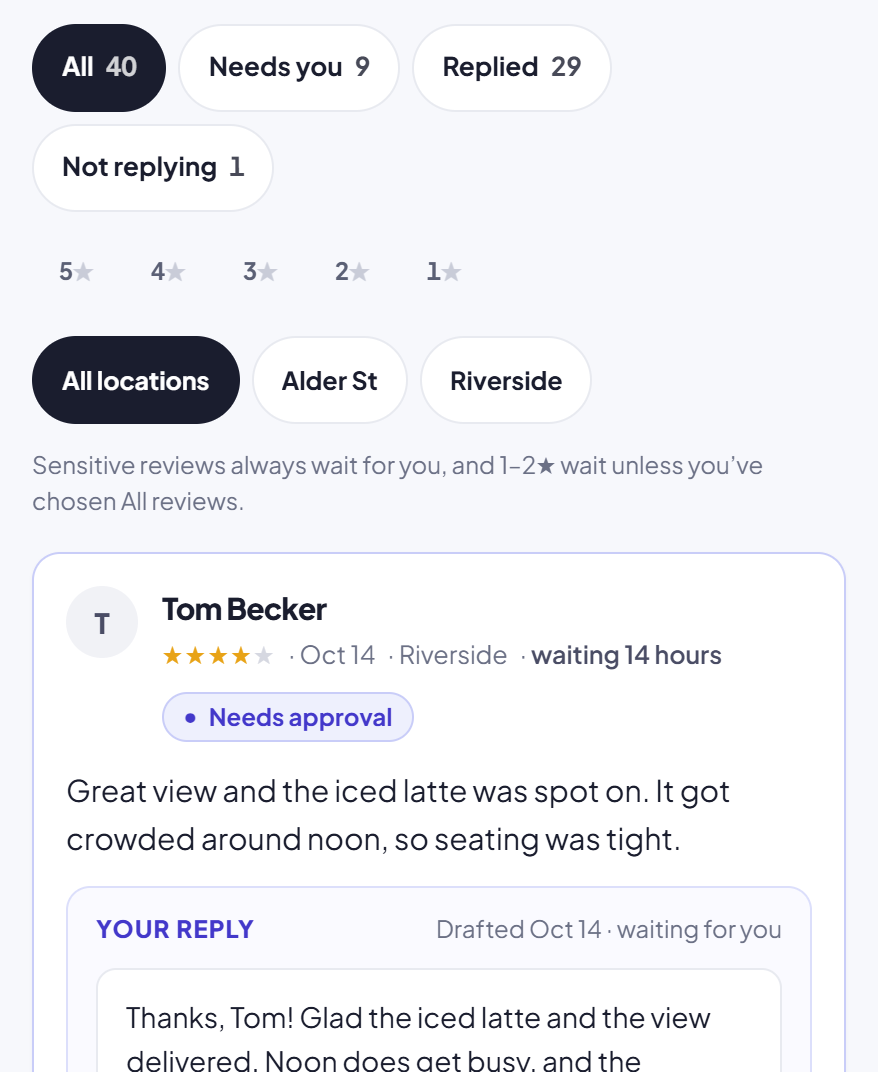
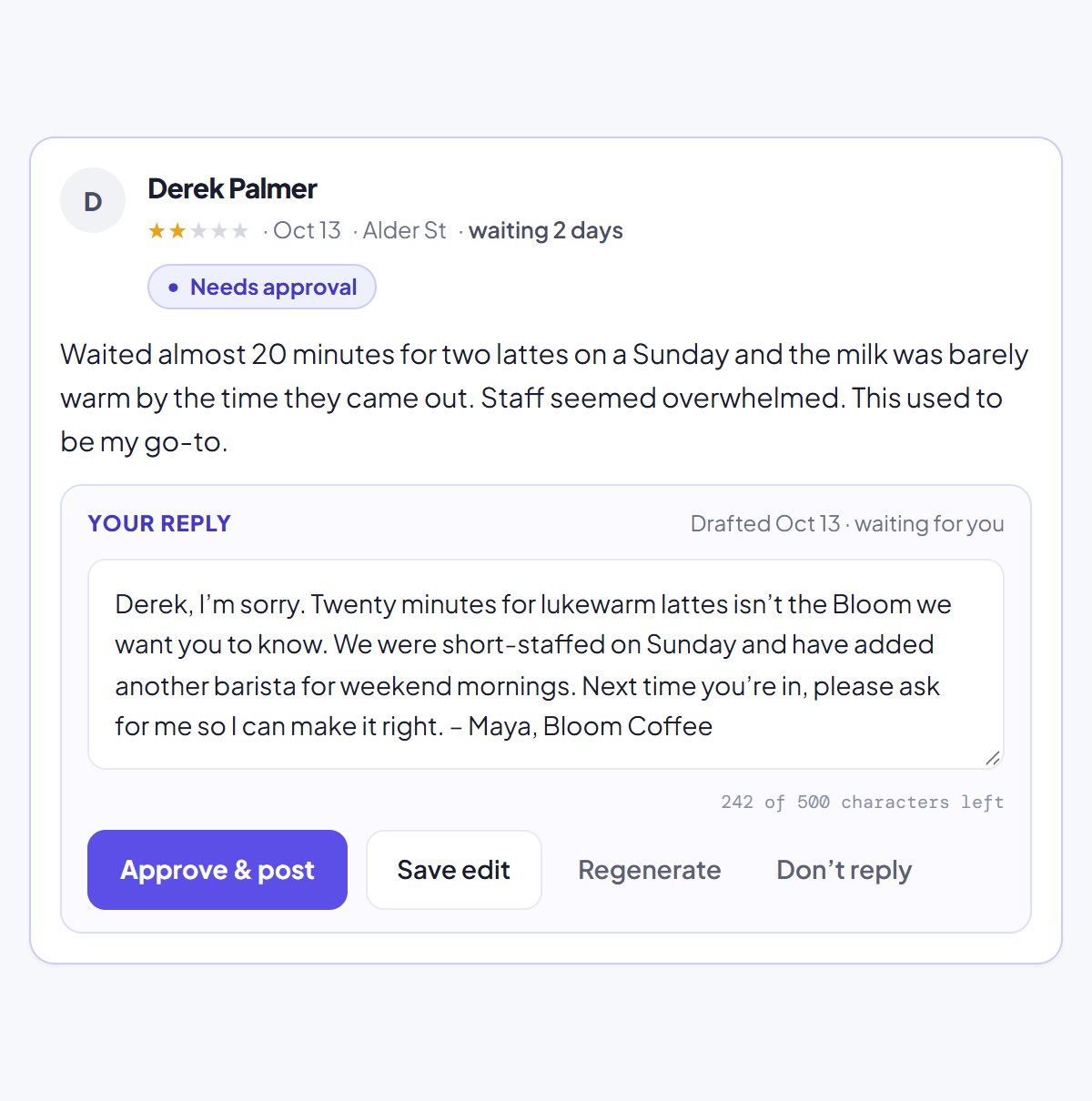
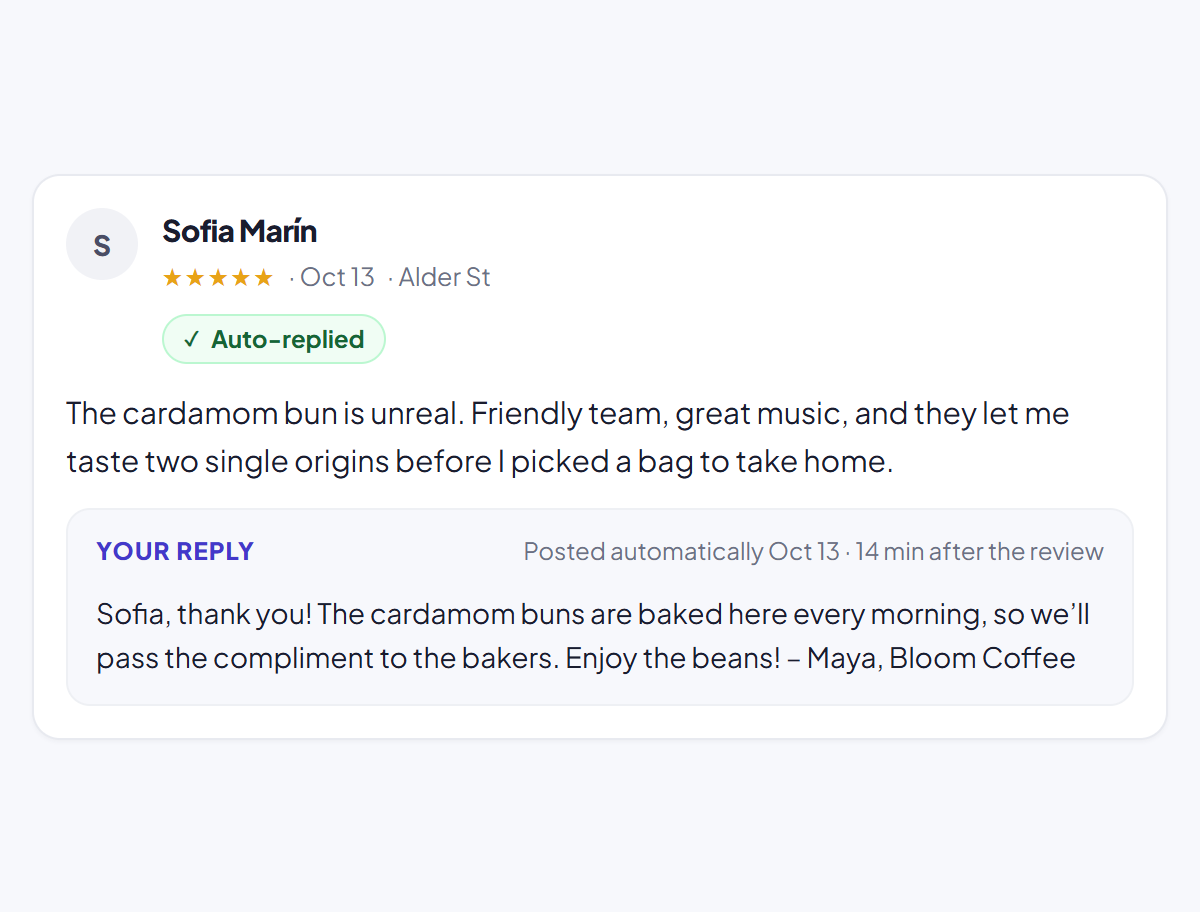
ReplyChamp builds the rules in. Every draft waits for you until you’ve approved 10, so you see how it writes before anything goes out alone. After that you pick the ratings that post on their own, for example 5★ only. Reviews of 1 or 2 stars keep waiting for you unless you deliberately choose “All reviews”, and reviews that mention health, safety, legal threats or refunds always wait, whatever you choose.
Here’s how a review moves through ReplyChamp:
What a single location actually needs
A platform like Birdeye covers dozens of jobs. For one or two locations, three of them matter most, and you can cover all three without a platform:
- Ask every customer for a review. Your Google review link and a QR card at the counter do most of the work. Our free review link and QR code tool makes both, and our guide on how to get more Google reviews covers what to say.
- Answer every review, in your own voice. This is the job ReplyChamp does.
- Keep your Google Business Profile current. Hours, photos and services. For one location this is a few minutes a month by hand.
If you also need text messaging with customers, a website chatbot, listings on dozens of directories or surveys, that’s when a bundle starts to pay off.
When Birdeye is the better choice
- You run many locations and want one dashboard and one contract for all of them.
- You collect reviews on several sites, not only Google.
- You also want listings management, customer messaging, a website chatbot, surveys or ticketing.
- You have a marketing or operations person whose job includes running the platform.
If that’s you, a single-purpose tool will feel too small. Get a written quote from Birdeye, check the renewal and notice terms, and compare it with the other platforms in our list of Birdeye competitors.
When ReplyChamp is the better choice
- You own the business and look after your own Google Business Profile.
- Google is where most of your reviews are.
- You want every review answered in your own voice, without spending an evening a week on it.
- You want a price you can see before you sign up, and to cancel any time.
- You want to approve the hard replies yourself and let the thank-yous go out on their own.
Every draft waits for you until you’ve approved 10. After that, auto-reply posts only the ratings you pick. 1–2★ reviews wait for you unless you deliberately choose All reviews, and reviews about health, safety, legal threats or refunds always wait.
How to switch from Birdeye to ReplyChamp
Switching is mostly about timing, because of the renewal notice. The replies you’ve already posted belong to your Google Business Profile, so they stay on Google whichever tool you use.
- Find your renewal date and notice deadline. Look at your Birdeye order form. Notice has to reach Birdeye at least 90 days before renewal.
- Send written notice of non-renewal in good time, and keep a copy.
- Export anything you want to keep from Birdeye before the term ends, such as review reports or contact lists.
- Turn off Birdeye’s automatic replies before you switch, so no review gets answered twice.
- Sign in to ReplyChamp with Google and connect the Business Profile you already manage.
- Approve your first 10 drafts. Edit them as much as you like; ReplyChamp learns how you write.
- Choose what posts on its own, for example 5★ only. Everything else waits for you.
- Keep asking for reviews with your Google review link and a QR card, which cost nothing.
Common questions
How much does Birdeye cost?
Birdeye doesn’t publish prices. Its pricing page asks how many locations you have and a sales team gives you a quote. Its G2 and Capterra listings show Starter, Growth and Dominate plans, all by custom quote. Ask for the price, setup fees and contract term in writing.
Does Birdeye have a contract?
Yes. Birdeye’s terms say agreements renew automatically for the same length as the first term unless you give written notice of non-renewal at least 90 days before the renewal date, and that payments are non-cancellable and non-refundable.
Is there a cheaper alternative to Birdeye for one location?
If what you mainly need is replies to your Google reviews, yes. ReplyChamp drafts and posts Google review replies in your voice for $7 per location per month, or $70 per year, with 10 free replies first. It doesn’t do listings, messaging or other review sites.
Does ReplyChamp do everything Birdeye does?
No. Birdeye is a broad platform: reviews from many sites, listings, messaging, social, a chatbot, surveys and ticketing. ReplyChamp does one thing, replying to Google reviews, for owners who look after their own Business Profile.
What happens to my replies if I leave Birdeye?
Replies you’ve already posted to Google belong to your Business Profile, so they stay on Google. Birdeye’s terms say you own your data; export any reports you want before your term ends.
Can I try ReplyChamp before paying?
Yes. Your first 10 replies are free and no credit card is needed. You can also try the public demo with a made-up café without signing in.
Verdict
Birdeye is a capable platform for brands with many locations, many review sites and a team to run it. If that describes you, its breadth is the point, and the quote and contract are part of buying software at that scale.
If you own one or a few locations and your real problem is unanswered Google reviews, you’d be paying for a lot you won’t open, on a contract that renews unless you remember to stop it. ReplyChamp does the reply job in your voice for $7 a location, holds the hard reviews for you, and lets you leave any month.
Your first 10 replies are free
No credit card. Then $7 per location per month, or $70 per year. See pricing.
Start freeSources
Checked on November 4, 2026. Prices are in US dollars unless the source says otherwise.